Set up OpenAI TTS
Follow these three steps to create an OpenAI API key and connect it to epubaudio.xyz.
Before you begin
You need:
- an epubaudio.xyz account;
- an OpenAI platform account;
- API billing or credits configured with OpenAI.
ChatGPT subscriptions and OpenAI API billing are separate. A ChatGPT Plus, Pro, or other ChatGPT plan does not automatically include API usage.
1. Open the API keys page
Go directly to OpenAI API keys and sign in to your OpenAI platform account.
2. Create a secret key
- Select Create new secret key.
- Keep Owned by set to You.
- Optionally enter a name, for example
epubaudio.xyz. - Select the project that has API billing configured. For most users, this is Default project.
- Keep Permissions set to All.
- Select Create secret key.
- Copy the key and store it temporarily in a secure password manager.
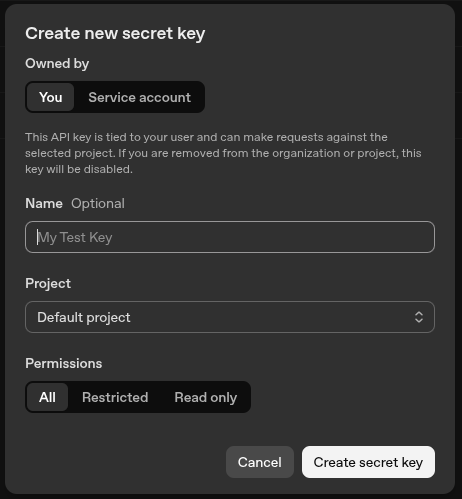
OpenAI displays the complete key only once. You will paste it into epubaudio.xyz in the next step.
3. Connect the key to epubaudio.xyz
- Sign in to epubaudio.xyz.
- Open My library.
- Select your avatar.
- Choose OpenAI TTS.
- Paste the key into API key.
- Configure the model, voice, and speed.
- Select Save settings.
After saving, epubaudio.xyz shows only a masked preview of the key.
Where is the API keys page?
Use this direct link: https://platform.openai.com/api-keys.
Keep API keys private
Never place an API key in a screenshot, public issue, chat message, or shared document.